Contextual Multi-Factor Authentication (MFA)
On this page
This page explains why and how FusionAuth asks for MFA during the login process.
For guidance on implementing MFA using FusionAuth, see the MFA documentation.
When is MFA Required?#
FusionAuth displays an MFA challenge to the user when a login attempt meets one of the following criteria:
- Does the tenant or application enable or require MFA?
- Has the user provided an MFA method?
- Did the user log in using an Identity Provider such as Google or OIDC? In this case, MFA is never required.
- Has the device passed appropriate contextual checks, such as using a known device?
The following diagram shows the FusionAuth MFA logic:
High level diagram of MFA logic.
Contextual Checks#
Contextual checks are based on attributes of the request evaluated every time a user authenticates. These checks include:
- Has this device been seen before?
- Has this user been seen before on this device?
- Is there a suspicious login detected for this authentication attempt?
The duration of trust of the device can be configured with the tenant.externalIdentifierConfiguration.twoFactorTrustIdTimeToLiveInSeconds configuration value.
The goal of this contextual check is to challenge the user for another factor of authentication whenever FusionAuth determines the risk of invalid access outweighs user friction.
Depending on your license, you can configure MFA policies at both the tenant and application level.
Tenant MFA Configuration#
Tenant configuration applies to all applications within a tenant. The MFA policy has the following values:
Disabled: no MFA challenge occursEnabled: an MFA challenge occurs only if the user has a valid MFA methodRequired: an MFA challenge always occurs, requires users without MFA to configure an MFA methodChallengeOnHighRisk: see Intelligent MFA for moreChallengeOnMediumRisk: see Intelligent MFA for more
Here's a diagram of the MFA challenge logic when the tenant has a policy for MFA that is not an Intelligent MFA policy.
Tenant MFA decision logic.
Application MFA Configuration#
Application configuration applies to a single application within a tenant. Application policies always supersede the tenant policy.
With an active application MFA configuration, there is an MFA policy with the following possible values:
Disabled: no MFA challenge occursEnabled: an MFA challenge occurs only if the user has a valid MFA methodRequired: an MFA challenge always occurs, requires users without MFA to configure an MFA methodChallengeOnHighRisk: see Intelligent MFA for moreChallengeOnMediumRisk: see Intelligent MFA for more
An additional trust policy determines if an application accepts the results of other MFA challenges with the following options:
Any: any application's challenge results are acceptableThis: only this application's challenge results are acceptableNone: no application's challenge results are acceptable, always displays an MFA challenge
Here's a table outline possible scenarios for different trust policies.
| Trust Policy | Example Application | Notes |
|---|---|---|
Any | Apps in a suite of applications such as Google Drive, Google Calendar and Gmail | Any MFA challenge is good enough since they all have roughly the same risk profile. |
This | A gambling application which uses real money in a suite which has other fantasy gaming apps. | The other fantasy gaming apps might not require MFA at all, but if they do, it's not a high enough level of security for the "real money" gambling application. |
None | An internal admin dashboard | Access should be strictly controlled and user friction is not an issue. |
Here's a diagram of the MFA challenge logic when the application has a policy for MFA that is not an Intelligent MFA policy.
Diagram of application MFA decision logic.
License Limitations#
Not all plans support all MFA features. The plan you are on affects the MFA options available to you and your users. For more information, see plans and features.
The following contextual MFA features are limited to the specified plan.
Enterprise Only#
- Application MFA policies
- Suspicious Login Contextual Check
- MFA Requirement Lambda, Including Risk Score
- Impossible Travel Intelligent MFA Signal
- Client Risk Configuration
Any Paid Plan#
- Email MFA
- Intelligent MFA Policies
- Nine Intelligent MFA Signals
- SMS MFA
- User MFA Enrollment Account Management Pages
Any Plan#
- TOTP MFA
- Tenant MFA policies
- User MFA Enrollment APIs
- Application MFA policies for the FusionAuth Admin UI only
MFA Challenges After Identity Provider Login#
If a user logs in with an Identity Provider such as Google or OIDC, FusionAuth does not challenge for MFA. FusionAuth trusts that the correct MFA challenge process happens at Identity Provider.
You can override this by using an MFA requirement lambda and examining the authenticationType parameter.
Intelligent MFA#
Available since1.68.0
Intelligent MFA uses risk signals integrated into FusionAuth to determine the risk level of a login attempt.
To use these risk signals when determining whether to present an MFA challenge to a user, you can:
- choose a tenant login policy of
ChallengeOnHighRiskorChallengeOnMediumRisk - manually use the aggregate risk level (
LOW,MEDIUM, orHIGH) in thecontextof an MFA requirement lambda
Roll Out Intelligent MFA#
Every user population is different. With Intelligent MFA, you want to reduce challenges for legitimate users, but still challenge when our proprietary algorithm indicates a possibility of an attacker or account takeover.
The rollout options differ by plan, because only the Enterprise plan can observe risk without acting on it.
With an Enterprise Plan#
On the Enterprise plan, any configured MFA requirement lambda logs risk and riskSignals to the event log when debug is enabled. You can use this behavior to measure first, then enforce.
- Collect a baseline (optional).
- Enable the
user.two-factor.challenge,user.two-factor.success, anduser.two-factor.failed_attemptwebhooks and collect MFA metrics. You can also read the numbers on the Reactor tab. - Calculate your current challenge rate, which is the number of MFA challenges per DAU or logins. You can pull the denominator using the reporting API or the login API, respectively.
- You can also collect the number of MFA-related customer support requests.
- Enable the
- Gather the risk scores but do not apply the policy (optional).
- Enable an MFA requirement lambda, but mimic your existing policy so that behavior does not change for your users; see below for sample lambdas.
- Enable the debug toggle on the tenant Multi-Factor tab to log the user Id, composite risk, and riskSignals. If you do not already use an MFA requirement lambda, adding one means the MFA requirement decision is delegated to the lambda. You can use the sample MFA requirement lambdas below.
- Capture the logs (optional).
- Set up an event log create webhook to capture the logs. Discard any that are not MFA composite risk log events. Store the values, including the composite score and the user Id in a database to analyze.
- Analyze the logs (optional).
- From the log data, compare the count of
HIGHandMEDIUMcomposite scores to the count of challenges in your baseline. - Review a sample of
HIGHscores to see if they are legitimate users andLOWscores to see if they are not. The two risk policies ignore "trust this device", so users currently skipped by a trusted device are re-evaluated on risk and may be challenged.
- From the log data, compare the count of
- Pilot risk-based MFA.
- Apply an application-level risk-based policy to one non-critical application. This will require users who don't have MFA to enable it.
- Modify the lambda to challenge on
HIGHrisk for this application. - Keep reviewing the log data and verify challenge volume matches the shadow estimate.
- Collect the number of MFA related customer support requests and compare it to the baseline, scaled based on the relative number of logins for this application.
- Widen risk based MFA rollout.
- Expand the application based configuration to more applications. Choose whether to challenge on high or medium/high per application. Use the MFA requirement lambda for any per-application exceptions.
- Turn off MFA debugging as you roll risk scoring MFA out further and have more confidence in how your users interact with the MFA challenge.
- Monitor the rollout.
- Continue to calculate your challenge and challenge success rates.
- You can also watch the suspicious login webhook (the
threatsDetectedvalue) for trends in which threats your users detect.
To roll back, revert the policy or the lambda to the previous value. This is a configuration change only.
Without an Enterprise Plan#
On other paid plans, risk signals are calculated only when a risk policy is enabled, and the policy enforces immediately. There is no shadow mode, so roll out small and reversibly.
- Record baseline data. Record your current challenge rate from the Reactor tab counts.
- Pilot risk based MFA. Set "Challenge On High Risk" on a dedicated low-traffic or internal tenant.
- Measure the impact. Compare the Reactor counts for this tenant to your baseline.
- Widen the rollout. Enable the policy on additional tenants, one at a time.
To roll back, set the policy to your previous MFA policy.
Example MFA Requirement Lambdas#
The following example MFA requirement lambda mimics the Disabled tenant policy:
function checkRequired(result, user, registration, context) {
  result.required = false;
}
This lambda mimics the Enabled tenant policy:
function checkRequired(result, user, registration, context) {
  var methods = (user.twoFactor && user.twoFactor.methods) || [];
  result.required = methods.length > 0;
}
The following lambda mimics the Required tenant policy:
function checkRequired(result, user, registration, context) {
  result.required = true;
}
The following lambda mimics an application policy:
// Returns true when an existing two-factor trust should bypass the challenge,
// per the application's applicationMultiFactorTrustPolicy.
function hasValidTrust(context) {
  // Default to 'Any' to match FusionAuth's default trust behavior when unset.
  var trustPolicy = (context.policies && context.policies.applicationMultiFactorTrustPolicy) || 'Any';

  // 'None' never honors an existing trust.
  if (trustPolicy === 'None') {
    return false;
  }

  var trust = context.mfaTrust;
  if (!trust) {
    return false;
  }

  // Reject an expired trust.
  if (trust.expirationInstant && trust.expirationInstant <= Date.now()) {
    return false;
  }

  // 'This' only honors a trust established by the current application.
  if (trustPolicy === 'This') {
    var currentAppId = context.application && context.application.id;
    return !!currentAppId && trust.applicationId === currentAppId;
  }

  // 'Any' honors a valid trust from any application.
  return true;
}

function checkRequired(result, user, registration, context) {
  var policies = context.policies || {};

  // Effective login policy: the application overrides the tenant when set.
  var loginPolicy = policies.applicationLoginPolicy || policies.tenantLoginPolicy;

  // Does the user have a configured MFA method?
  var methods = (user.twoFactor && user.twoFactor.methods) || [];
  var hasMethod = methods.length > 0;

  // Base requirement from the login policy.
  var required;
  if (loginPolicy === 'Required') {
    required = true;       // always challenge; FusionAuth forces enrollment if no method exists
  } else if (loginPolicy === 'Enabled') {
    required = hasMethod;  // challenge only when the user has a method
  } else {
    required = false;      // Disabled, or no policy set
  }

  // Honor the application trust policy. An existing trust only matters
  // when a challenge would otherwise occur.
  if (required && hasValidTrust(context)) {
    required = false;
  }

  result.required = required;
}
Client Risk Configuration#
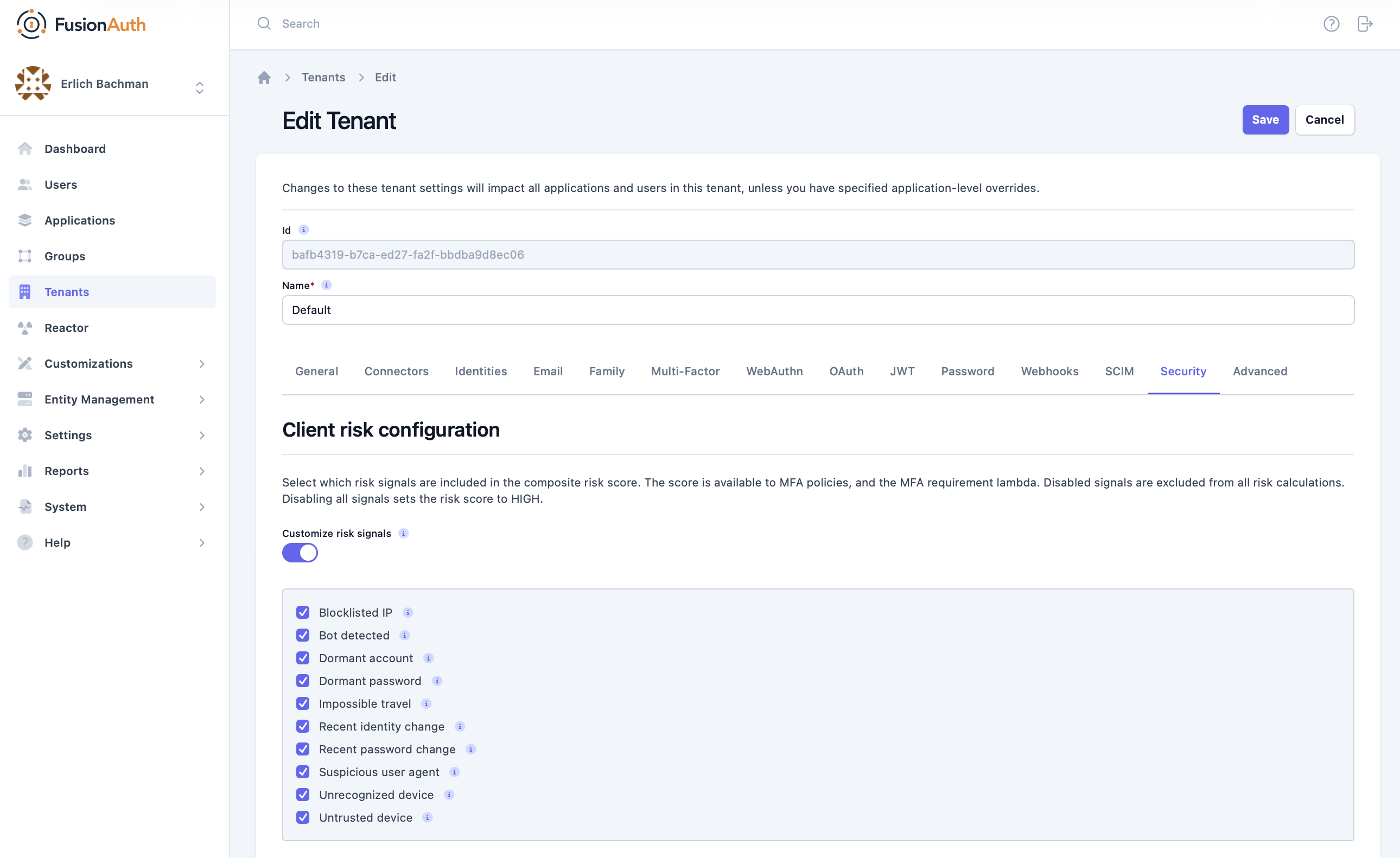
Under Tenants -> Your Tenant -> Security , navigate to the Client risk configuration section. Enable or disable individual signals with the Customize risk signals toggle.
When a signal is disabled, it will not be included in any intelligent MFA risk calculations.
Custom MFA Logic#
You may need more granularity on who is challenged for an additional factor during login. For example, you might want everyone who is a member of a certain group or has a certain user.data field to complete an MFA challenge.
To customize MFA to meet your needs, use one of the following methods:
MFA Requirement Lambda#
Under Customization -> Lambdas , create a new Lambda of type MFA requirement lambda.
The following example forces an MFA check for any user whose email address includes the string 'gilfoyle':
function checkRequired(result, user, registration, context) {
  if (user.email.includes('gilfoyle')) {
    result.required = true;
  }
}
For more information, see the MFA requirement lambda documentation.
Use a Webhook#
- Set a tenant or application policy to
Enabledand then use the API to ensure that everyone in themfa_requiredgroup has an MFA method. - Use a transactional
user.updatewebhook to ensure that the MFA method can't be removed while the user is in that group. - Set the trust duration to be the same or less than your session length.
- If you are using the application policy, set the trust policy to
This.
Redirect Users Through a Special Application#
The following example guarantees that all users in the mfa_required group are challenged with MFA whenever they log in:
- Create an "MFA check" application with an MFA policy of
Requiredand a trust policy ofNone. - After a user logs in, examine their profile on an interstitial page.
- If they are in the
mfa_requiredgroup, redirect them to this application. They will be prompted for MFA and then redirected to the initial application. - Users that are not in the
mfa_requiredgroup can be sent directly through to the application.
- If they are in the
Make sure the MFA check application uses a lambda to set the aud and applicationId claims to values expected by any access token consumers.
This is similar to doing a conditional step-up authentication on the interstitial page, without using the step-up API.
MFA Challenges Outside Of The Login Process#
If you need to prompt for MFA outside of the login process, use step-up authentication. For example, you could display an MFA challenge when a user performs a high-risk action like initiating a money transfer. Use the 2FA API to perform this process.
For more information, see the step-up authentication documentation.
Limitations On MFA Challenges#
When you disable an MFA method, any users who previously configured that method can continue to use the method. However, users cannot register a new instance of the disabled MFA method. To remove existing registrations for an MFA method, you must search for users who use that MFA method (e.g. a queryString of twoFactor.methods.method:email to detect every user registered for email MFA), then script a removal of the MFA method from each User object using the update a user API.